
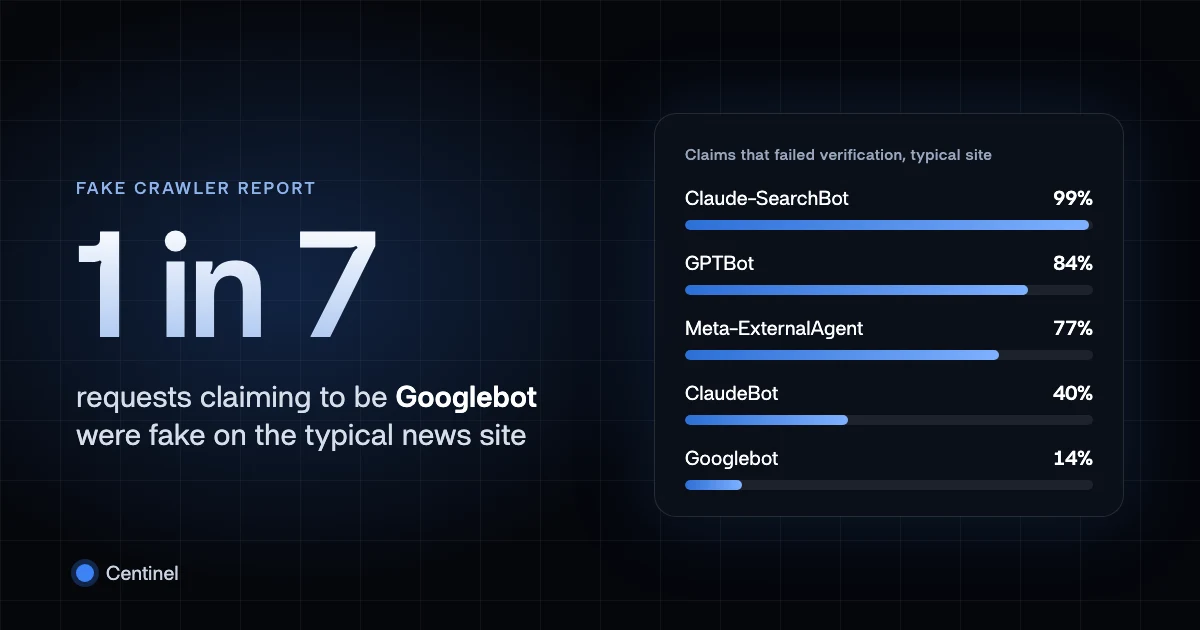
A request that says Googlebot in its user agent is only claiming to be Googlebot. The header is text the client chooses, and Google's crawler documentation warns that the user agent can be spoofed. The claim becomes an identity only when the address the request came from checks out against what Google publishes: a reverse DNS name under a Google domain that resolves back to the same address, or a match in Google's published IP range files.
Fakes are common. On the news and media sites in our fake crawler report, 1 in 7 requests calling itself Googlebot on the typical site did not come from Google. To check a single address now, paste it into the crawler IP checker. The rest of this guide shows how to run the same checks yourself and where they go wrong.
Why a fake Googlebot is worth catching
Sites treat Googlebot differently from other clients. Rules often let it past rate limits, paywalls, login walls and bot challenges, because blocking the real crawler costs search visibility. That exception is what an impersonator is after. A scraper that sends the Googlebot user agent inherits whatever the site grants the name.
In the report's data, the fakes looked like scrapers rather than broken crawlers:
- 88% of fake Googlebot requests came from datacenter addresses, about a third of them from a single European hosting provider.
- 95% of fake Googlebot requests asked for pages rather than images, scripts or stylesheets, against 85% for the real Googlebot.
- 94% of fake Googlebot requests claimed the real Googlebot's current version string, so the header itself gives nothing away.
Those figures cover news and media sites from late June to 21 September 2026. Each is a share, not a count, and each comes from at least five sites. Other kinds of site will see different proportions, but the mechanism is the same anywhere a rule trusts the name.
Verify an IP with reverse and forward DNS
Google's verification guide describes the manual check. It takes two lookups.
First, a reverse lookup of the address from your log:
$ host 66.249.66.1
1.66.249.66.in-addr.arpa domain name pointer crawl-66-249-66-1.googlebot.com.
Second, a forward lookup of the name you got back:
$ host crawl-66-249-66-1.googlebot.com
crawl-66-249-66-1.googlebot.com has address 66.249.66.1
The request is from Google when both hold: the name ends in googlebot.com or google.com,
and the forward lookup returns the address you started with. The second lookup is the one that
matters. Whoever controls an address can set its reverse record to any name, including
crawl-1-2-3-4.googlebot.com. Only Google can make a googlebot.com name resolve forward to
that address.
A fake usually fails at the first step:
$ host 203.0.113.7
Host 7.113.0.203.in-addr.arpa. not found: 3(NXDOMAIN)
No reverse record, or a name under someone else's domain, means the address is not a Google crawler, whatever the user agent says.
The googleusercontent.com trap
Google's guide lists a third domain, googleusercontent.com. Accepting it as proof of
Googlebot is a mistake.
Google Cloud gives a virtual machine's external address a reverse DNS name under
googleusercontent.com unless the customer sets their own, as the
Compute Engine PTR documentation
describes. Those names forward-confirm. An address on a rented machine resolves to a name such
as <address>.bc.googleusercontent.com, and that name resolves back to the same address. Both
lookups pass, and the request came from whoever rented the machine.
That matters for fake crawlers in particular. At least half of the fake GPTBot, ClaudeBot,
PerplexityBot and ChatGPT-User requests in the report came from Google Cloud. A check that
accepts googleusercontent.com would have called many of them Google.
Google uses that domain for some of its user-triggered fetchers, such as tools that fetch a page because a person asked for it. Those are not Googlebot. To verify one, match the address against that range file rather than trusting the domain.
Match against Google's published IP ranges
Reverse DNS costs two lookups per address. For log analysis or a firewall rule, Google publishes the same information as JSON files, each a list of IPv4 and IPv6 prefixes:
- common-crawlers.json covers Googlebot and the other common crawlers.
- special-crawlers.json covers the special-case crawlers described below.
- user-triggered-fetchers.json, linked above, covers fetchers acting on a user's request.
Each file carries a creationTime, and Google changes the ranges over time. Fetch them on a
schedule, not once. An address inside a prefix in the right file is from that group of Google
crawlers. An address outside all of them is not, and a user agent naming Googlebot on that
request is false.
The files and the DNS check agree in practice. In the report's data, 99.99% of requests that passed verification were inside the operators' published ranges, and 98% of requests that failed were outside them.
Special-case crawlers verify differently
Google's
special-case crawlers,
such as AdsBot-Google and Mediapartners-Google, work for a specific Google product where the
site and the product have an agreement about the access. Google says they may ignore
robots.txt rules, and AdsBot ignores the
global User-agent: * group, so only a rule that names it applies.
Their reverse DNS names end in google.com, in the form
rate-limited-proxy-66-249-90-77.google.com, not googlebot.com. Their addresses are in
special-crawlers.json, not common-crawlers.json. A check that only accepts googlebot.com, or
only loads the common-crawlers file, will reject real AdsBot traffic.
What to do with a fake
A request that fails the check is not Google. Treat it like any other unknown client: apply your normal rate limits, challenges and access rules, without the exceptions you grant to search crawlers. Blocking it by the user agent alone would also block the real Googlebot, so key the exception on verified identity instead.
For the real crawler, verification tells you who sent the request, not whether you want it. The Googlebot profile lists its robots.txt token, what blocking it does and its verification details. For other operators and a broader method, see how to verify AI agents.